
Introduction: Why Malware Still Matters in 2026
In today’s always-connected digital world, malware remains one of the most persistent and damaging cybersecurity threats. From personal laptops and smartphones to enterprise servers and cloud environments, malicious software continues to evolve in sophistication, scale, and impact.
In our opinion, many users underestimate malware because they associate it only with obvious viruses or pop-up ads. In reality, modern malware is far more advanced. It can silently steal credentials, spy on user activity, encrypt entire networks for ransom, or hijack computing resources without leaving visible signs.
Based on our experience and research, understanding what malware is, how it works, and how different malware types operate is the first and most critical step toward effective digital protection. This guide is written for a global audience, using simple and medium-level explanations, so both beginners and intermediate readers can follow along without difficulty.
In this in-depth article, you will learn:
- What malware actually means in practical terms
- How malware spreads and infects systems
- The 12 most powerful types of malware, explained clearly with real-world context
- Proven methods to protect your devices, data, and online identity
Table of Contents
What Is Malware?
Malware is a shortened form of the term malicious software, and it broadly refers to any type of program, script, or digital code that is intentionally created to cause harm or operate without the user’s permission. In simple terms, malware is software with bad intentions. Unlike trusted applications that are designed to improve productivity, provide entertainment, or solve problems, malware exists solely to exploit systems, users, or data for unethical or illegal purposes.
In our opinion, many people misunderstand malware as just a “computer virus,” but by our experience working with cybersecurity topics, malware is a much wider and more complex category. It includes a variety of harmful programs that behave differently depending on their purpose. Some malware is aggressive and destructive, while other forms are designed to remain invisible, quietly collecting information over long periods. This silent behavior often makes malware more dangerous, as users may not realize their systems are compromised until serious damage has already been done.
By our research, the primary goals of malware usually fall into several categories. One of the most common objectives is data theft. Malware can steal sensitive information such as passwords, financial details, private documents, login credentials, and personal communications. In other cases, malware is used to disrupt normal system operations by slowing down devices, crashing applications, or corrupting important files. Some malware grants attackers remote access, allowing them to control infected devices as if they were sitting in front of them.
Another critical motivation behind malware is financial gain. Cybercriminals often use malware to generate illegal profits through fraud, ransomware, cryptomining, or by selling stolen data on underground markets. In our experience analyzing real-world cases, many attacks are automated and designed to spread further, infecting other devices within the same network or through shared links and files.
It is also important to understand that malware no longer targets only traditional desktop computers. Today, it actively attacks smartphones, tablets, smart TVs, wearable devices, Internet of Things (IoT) products, and cloud-based systems. Even platforms built using Low-code and No-code environments can become vulnerable if security controls are weak or misconfigured. This widespread reach makes malware a universal threat, affecting individuals and organizations regardless of their technical background.
Based on our experience, recognizing what malware truly is—and how broadly it operates—is the foundation of effective digital safety. The more users understand the intent, behavior, and scope of malware, the better equipped they are to protect their devices, data, and online identity in an increasingly connected world.
How Malware Works: A Simple Breakdown
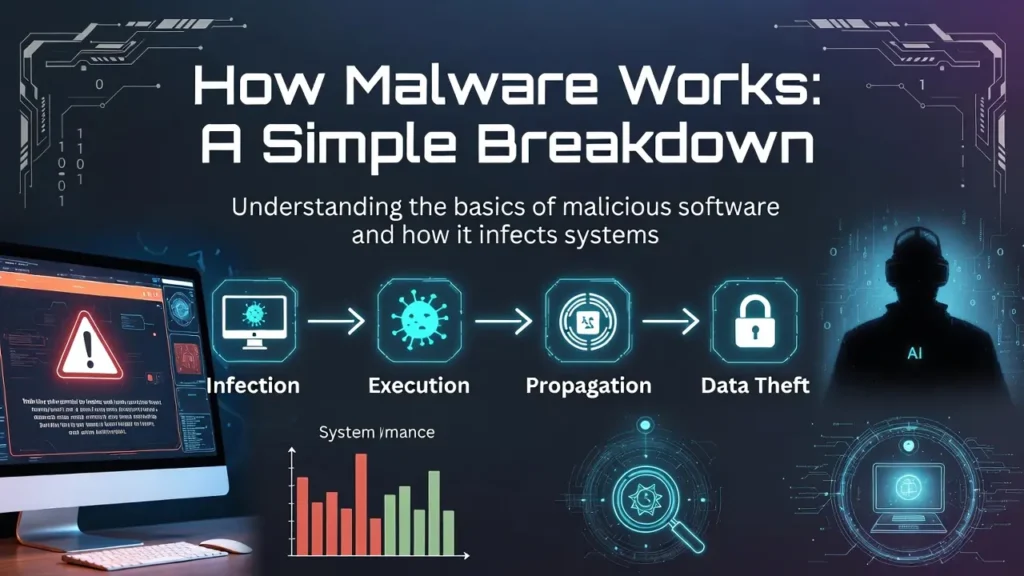
Although malware appears in many different forms and serves a wide range of malicious purposes, by our experience studying cybersecurity incidents, most malware follows a broadly similar lifecycle. Understanding this lifecycle helps users recognize threats earlier and appreciate how a small mistake—like clicking the wrong link—can escalate into a serious security breach. In our opinion, breaking malware behavior into simple stages makes an otherwise complex topic far easier to understand.
1. Entry Point (Infection Vector)
The first step in how malware works is gaining entry into a system. This is often referred to as the infection vector. By our research, attackers rely heavily on human behavior at this stage. Common entry points include phishing emails with infected attachments, fake links that lead to malicious websites, compromised advertisements, and software downloads from untrusted sources. Malware can also spread through USB drives, external storage devices, or fake mobile applications that appear legitimate. In recent years, we have seen malware targeting environments built with Low-code and No-code platforms as well, especially when users install third-party extensions without verifying their security.
2. Execution
Once malware successfully enters a device, it must execute its code to begin operating. Some malware activates immediately, while more advanced threats delay execution to avoid raising suspicion. In our experience analyzing real-world attacks, delayed execution is a common tactic used to bypass antivirus scans and user awareness. During this phase, malware may disguise itself as a normal system process or legitimate application.
3. Persistence
Persistence is what allows malware to survive over time. Advanced malware often alters system settings, startup processes, or registry entries so it can automatically relaunch after a reboot. By our research, this stage is critical for long-term attacks, as it enables malware to remain hidden for weeks or even months without detection.
4. Payload Activation
This is the stage where the malware fulfills its primary purpose. Depending on the type, the payload may steal sensitive data, monitor user activity, encrypt files for ransom, spy through device sensors, or hijack system resources. In our opinion, this phase causes the most damage and is often noticed only after significant harm has already occurred.
5. Propagation (Optional)
Some malware is designed to spread further. It may copy itself to other devices on the same network, send infected links to contacts, or exploit shared resources. By our experience, self-propagating malware can turn a single infected device into a large-scale security incident very quickly.
Overall, understanding how malware works step by step empowers users to spot warning signs early and adopt safer digital habits in an increasingly connected world.
The 12 Powerful Types of Malware Explained
1. Virus
A computer virus is one of the oldest and most well-known forms of malware, yet it remains relevant even in today’s advanced digital landscape. A virus is malicious code that attaches itself to legitimate files, programs, or documents. When the infected file is opened or executed by a user, the virus activates and begins carrying out its harmful actions. In simple terms, the virus relies on a host file to survive and spread.
Key characteristics:
- Requires user action to spread
- Can corrupt or delete files
- Often slows down system performance
Although viruses are less common today compared to threats like ransomware or spyware, they have not disappeared. By our observation, viruses still frequently appear in pirated software bundles, fake software updates, and malicious email attachments disguised as invoices, exam results, or job offers. Even users working with Low-code and No-code tools are not immune if they rely on unsafe plugins, templates, or external files from unverified sources.
2. Worm
A worm is a highly aggressive type of malware that differs significantly from traditional computer viruses. Unlike viruses, worms do not require any user interaction to spread. By our experience studying cybersecurity incidents, this single characteristic makes worms one of the most dangerous and disruptive malware types in existence. Once a worm gains access to a system, it can automatically replicate itself and move across networks without the user clicking a file, opening an attachment, or installing a program.
Why worms are dangerous:
- Extremely fast propagation
- Can overload networks and servers
- Often used to deliver additional malware
From our research, worms are commonly associated with large-scale corporate, government, and infrastructure attacks. Organizations with complex networks, cloud services, and automated workflows—including those built using Low-code and No-code platforms—can be particularly vulnerable if security patches and access controls are neglected. A single unprotected endpoint can become the entry point for widespread infection.
3. Trojan Horse
A Trojan Horse, commonly referred to as a Trojan, is one of the most deceptive and psychologically manipulative types of malware. Unlike viruses or worms, a Trojan does not spread itself automatically or attach to other files. Instead, it disguises itself as legitimate or useful software while secretly carrying malicious code in the background. In our opinion, this disguise-based approach makes Trojans especially dangerous because they exploit trust rather than technical vulnerabilities.
Common Trojan examples:
- Fake antivirus software
- Cracked games or paid apps
- Email attachments labeled as invoices or reports
Once installed, Trojans may open backdoors, steal data, or install more malware.
4. Ransomware
Ransomware is one of the most destructive and financially damaging types of malware in the modern cybersecurity landscape. Its core purpose is simple but devastating: it encrypts a victim’s files and demands payment in exchange for restoring access. In our opinion, ransomware stands out because it directly targets what users value most—their data—and uses urgency and fear as powerful weapons.
Typical ransomware behavior:
- Encrypts documents, photos, and databases
- Displays a ransom note
- Often demands payment in cryptocurrency
In our experience, ransomware is one of the most financially damaging malware types, affecting individuals, hospitals, and governments alike.
5. Spyware
Spyware is a stealth-focused type of malware designed to secretly monitor user activity and collect information without the user’s knowledge or consent. In our opinion, spyware is particularly dangerous because it does not usually announce its presence through obvious system errors or visible damage. Instead, it operates quietly in the background, observing behavior and transmitting sensitive data to attackers over long periods of time.
What spyware can track:
- Browsing history
- Login credentials
- Location data
- Keystrokes
Spyware affects both individuals and organizations. Even users working within structured systems or using Low-code and No-code platforms can be at risk if third-party tools, plugins, or integrations are installed without proper verification. By our observation, trust in “free” tools is one of the most common entry points for spyware infections.
6. Adware
Adware is a type of malware designed to display unwanted advertisements and redirect users to promotional or sponsored websites, often without their consent. In our opinion, adware is frequently underestimated because it does not always cause immediate or obvious damage. However, by our experience analyzing long-term system behavior, adware can significantly impact both performance and user privacy over time.
Is adware dangerous?
While often considered less harmful, adware can:
- Degrade system performance
- Track user behavior
- Lead users to malicious websites
Even users working in structured digital environments or using Low-code and No-code platforms are not immune. Installing unverified browser extensions, plugins, or third-party tools can introduce adware into otherwise secure systems.
7. Keylogger
A keylogger is a highly invasive type of malware designed to record every keystroke typed on a device. This includes everything from casual messages and search queries to highly sensitive information such as passwords and financial data. In our opinion, keyloggers are among the most dangerous malware types because they directly observe user input rather than trying to break encryption or guess credentials.
Data commonly stolen:
- Email passwords
- Banking credentials
- Social media logins
In our opinion, keyloggers are particularly dangerous because they bypass even strong passwords.
8. Rootkit
A rootkit is one of the most advanced and dangerous types of malware because it provides attackers with deep, administrative-level control over a system. The term itself comes from “root,” meaning the highest level of access in an operating system. In our opinion, rootkits are especially threatening not because of what they do immediately, but because of how well they hide and persist while giving attackers near-total control.
Why rootkits are hard to detect:
- Hide within the operating system
- Mask other malware
- Disable security tools
Rootkits are typically used in targeted attacks rather than mass infections.
9. Botnet Malware
Botnet malware is a type of malicious software that infects devices and turns them into “bots”—systems that can be remotely controlled by cybercriminals without the owner’s knowledge. In our opinion, botnets are especially alarming because they transform ordinary devices into weapons, often while continuing to function normally for their owners.
Botnets are used for:
- DDoS attacks
- Spam campaigns
- Credential stuffing attacks
Millions of devices worldwide can be part of a single botnet without owners realizing it.
10. Mobile Malware
Mobile malware refers to malicious software specifically designed to target smartphones and tablets, with Android devices being the most frequent targets. In our opinion, the rapid growth of mobile usage has made smartphones just as valuable to attackers as traditional computers, if not more. Mobile devices store personal conversations, financial apps, authentication codes, location data, and work-related information—all in one place.
Common mobile malware threats:
- Fake apps
- SMS-based attacks
- Banking Trojans
As mobile usage increases, attackers are increasingly focusing on mobile platforms.
11. Fileless Malware
Fileless malware is one of the most sophisticated and stealthy forms of modern cyber threats. Unlike traditional malware, it does not rely on installing malicious files on the hard drive. Instead, it operates entirely in system memory (RAM) and leverages legitimate system tools to carry out malicious activities. In our opinion, this makes fileless malware especially dangerous because it leaves very few traces behind for traditional security tools to detect.
Why it’s dangerous:
- Hard to detect with signature-based antivirus
- Uses legitimate system tools
- Often used in advanced persistent threats
From our experience, fileless malware is becoming more common in enterprise environments.
12. Cryptojacker
Cryptojacking is a form of malware that secretly hijacks a victim’s CPU or GPU power to mine cryptocurrency for the attacker’s profit. Unlike many other malware types, cryptojackers usually do not aim to steal data, encrypt files, or visibly damage systems right away. In our opinion, this subtlety is exactly what makes cryptojacking dangerous—it exploits resources quietly while often going unnoticed for long periods.
Signs of cryptojacking:
- Overheating devices
- High CPU usage
- Battery drain
Although it may not steal data, cryptojacking significantly reduces device lifespan and performance.
How Malware Spreads in Real Life
Malware spreads through multiple everyday digital activities:
- Clicking phishing emails
- Downloading pirated software
- Visiting compromised websites
- Installing fake browser extensions
- Connecting infected USB drives
In real-world usage, most infections occur due to human error rather than technical flaws.
Best Malware Protection Methods (Proven and Practical)
1. Use Reputable Security Software
Install trusted antivirus and anti-malware tools with real-time protection.
2. Keep Software Updated
Regular updates patch vulnerabilities that malware exploits.
3. Enable Firewalls
Firewalls block unauthorized incoming and outgoing connections.
4. Avoid Suspicious Links and Downloads
Be cautious with emails, ads, and unknown websites.
5. Use Strong, Unique Passwords
Password managers reduce the risk of credential theft.
6. Backup Data Regularly
Offline and cloud backups protect against ransomware.
7. Install Apps Only from Official Sources
Avoid third-party app stores and cracked software.
8. Educate Yourself and Your Team
Cybersecurity awareness is one of the most effective defenses.
Malware vs Virus: Are They the Same?
No. A virus is one type of malware, while malware is a broad category that includes viruses, worms, Trojans, ransomware, and more.
Why Malware Is Still a Major Threat in 2026
From our research, malware continues to evolve due to:
- Increased remote work
- Growth of cloud services
- Rising cryptocurrency adoption
- Expansion of IoT devices
Attackers constantly adapt, making cybersecurity an ongoing process rather than a one-time setup.
Conclusion: Staying Ahead of Malware Threats
Malware is no longer just a technical problem—it is a real-world risk affecting privacy, finances, and digital trust. Understanding how malware works and recognizing different malware types empowers users to make safer decisions online.
In our opinion, the most effective defense against malware is a combination of technology, awareness, and disciplined digital habits. No security tool alone can provide complete protection, but informed users dramatically reduce their risk.
If you apply the protection methods discussed in this guide, you will be significantly better prepared to face modern malware threats in 2026 and beyond.
Frequently Asked Questions (FAQs)
What is malware in simple terms?
Malware is harmful software designed to damage, steal, or spy on digital systems.
Can malware infect smartphones?
Yes, especially through fake apps, malicious links, and unsecured Wi-Fi networks.
Is antivirus software enough?
Antivirus is essential but should be combined with updates, backups, and safe browsing habits.
Can malware steal passwords?
Yes. Spyware and keyloggers are specifically designed for this purpose.
What is the most dangerous type of malware?
Ransomware and fileless malware are currently among the most damaging due to financial and detection challenges.
Pingback: 11 Best high-Income Freelancing Skills for Tech Professionals
Pingback: Social Engineering Attacks: 9 Critical Cybersecurity Threats